Plugin: Background Remover
A downloadable tool
Background Remover — Transparent PNG Plugin for EmoteShowcase
Important: Background Remover is a plugin for EmoteShowcase — a Windows desktop application. It is not standalone software. You must own EmoteShowcase to use this plugin. If you do not own it yet, purchase it here first.
What Is Background Remover?
An emote has to have a transparent background — but the artwork you are handed rarely does. A client sends a JPG. A reference comes back on a flat white sheet. An export goes out with the background layer still switched on. Background Remover takes those images and gives you clean transparent PNGs, in batch, without opening Photoshop for a two-minute job.
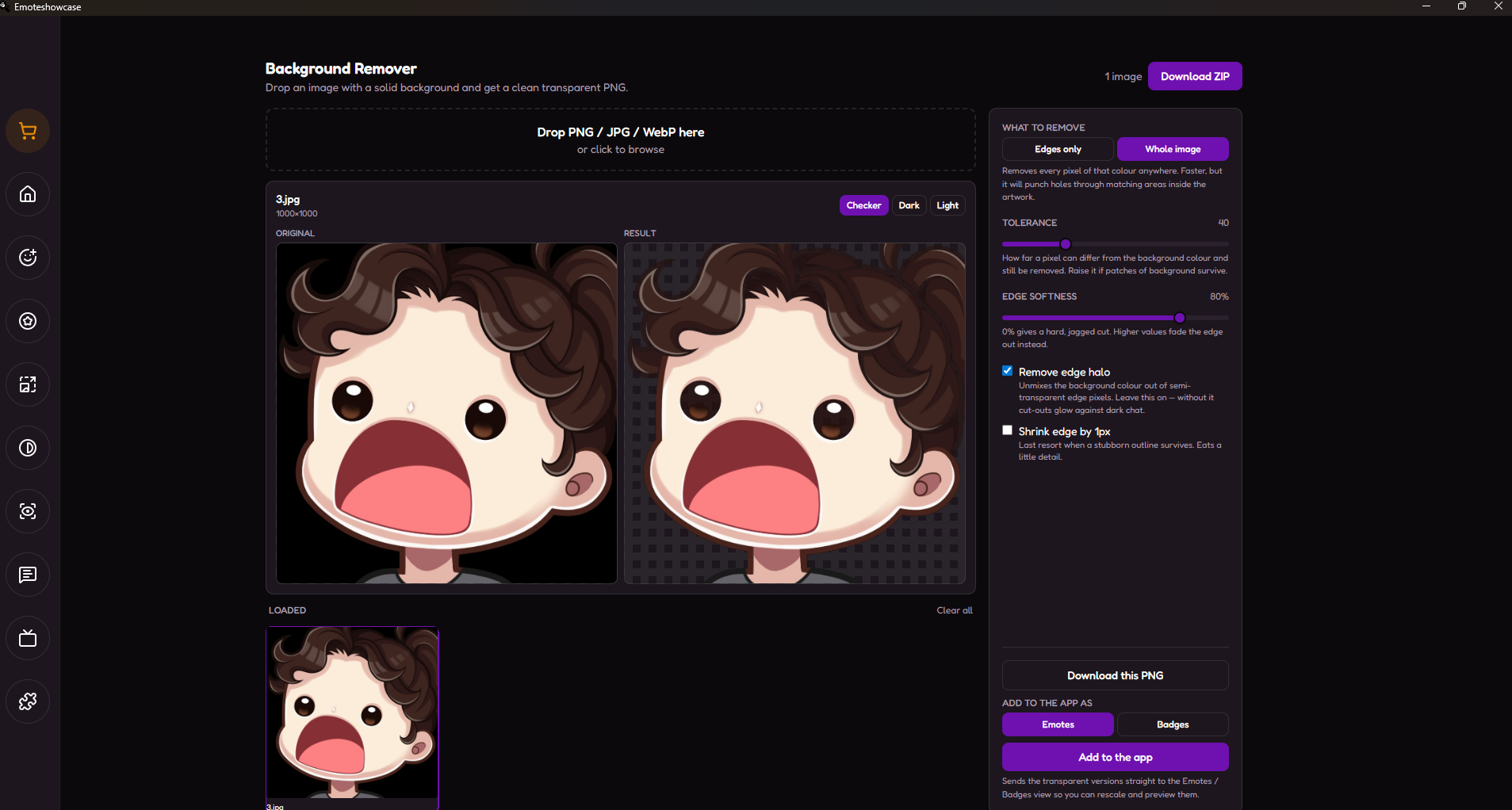
Drop your files in, and the plugin reads the background colour straight off the corners of each image. Adjust the tolerance until the preview looks right, and export — as single PNGs, as one ZIP, or sent directly into the Emotes and Badges views so you can rescale and preview them without leaving the app.
Please Read Before Buying — What This Plugin Does Not Do
This is not an AI cutout tool. It works by finding one flat background colour and removing it. That means:
- It works on solid, flat backgrounds. White, black, a chroma green, any single colour behind your artwork.
- It will not cut a subject out of a photograph, a painted scene, a strong gradient, or any busy background. There is no single colour to find, and the result will be poor. No amount of slider tweaking will fix this — it is how the tool works, not a bug.
- Animated GIFs are not supported. Only the first frame would survive, so the plugin refuses them outright rather than quietly ruining your animation. Export your frames as PNG first.
- The background colour is detected automatically from the corners of each image. On a normal flat background this is correct every time. If your subject fills all four corners, there is nothing for the plugin to read.
If your artwork sits on a flat colour, this plugin will save you a great deal of time. If you need to extract a character from a photo, buy something else — this is not that tool.
Key Features
Keeps The White Inside Your Artwork
This is the one that matters. A naive background remover deletes every white pixel in the image — which punches holes straight through white eyes, teeth and highlights. By default this plugin only removes background that is connected to the edge of the canvas, so the white inside your character stays exactly where you drew it. A second mode is there if you genuinely do want every matching pixel gone.
No Pale Halo Around The Edges
Edge pixels are part subject, part background — which is why cheap cut-outs glow with a pale outline the moment they land on Twitch's dark chat. Background Remover unmixes the background colour back out of every semi-transparent edge pixel, so your emote sits cleanly on any chat theme. Preview it yourself against the real Twitch dark and light backgrounds before you export.
Soft Edges, Not Jagged Ones
Instead of a hard on/off cut that leaves stair-stepped edges, transparency fades across the boundary so anti-aliased artwork keeps its smooth outline. Tune it with the softness slider, or take it to zero for a hard cut when that is what you want.
Live Side-By-Side Preview
Original and result, next to each other, updating as you drag the sliders. Switch the result background between a transparency checkerboard, Twitch dark, and Twitch light — because a halo you cannot see on white is obvious on black.
Batch, With Per-Image Colours
Drop in a whole folder. Each image gets its own background colour detected independently, so a white-background PNG and a green-screen JPG can be processed in the same batch. Export one PNG at a time, or all of them at once as a single ZIP.
Straight Into The App
One click sends your finished transparent PNGs into EmoteShowcase as emotes or badges — ready for the Rescaler, the Preview Simulator, the Chat Simulator and every other tool, with no saving and re-importing in between. Accepts PNG, JPG and WebP.
Why Use Background Remover?
- Stop opening Photoshop for one job: Client sent a JPG? Fixed in seconds, without leaving the app.
- Your artwork survives: White eyes, teeth and highlights stay intact instead of being punched through.
- Clean on dark chat: Halo removal means your emotes don't glow against Twitch's dark theme.
- Built for batches: A whole commission's worth of files in one pass, out as a single ZIP.
- Works offline: All processing is local. Your artwork never leaves your computer.
- No subscriptions: Buy once, use forever. Updates are included with your EmoteShowcase license.
How to Get It
- If you do not own EmoteShowcase yet, purchase it on Itch.io (Windows only).
- Download and install the latest version of EmoteShowcase.
- Open the app and go to the Plugin Store from the toolbar.
- Find Background Remover and click Buy Now — a purchase popup powered by Itch.io appears inside the app.
- Complete the purchase and download the plugin .zip file.
- Go to Plugin Manager, click Install Plugin, and select the .zip file.
- The Background Remover view will appear in your tools. Drop in your images and start cleaning them up.
Windows Security Notice: When you first run EmoteShowcase on Windows, you may see a SmartScreen warning that says "Windows protected your PC." This is normal for applications that are not digitally signed. Click "More info" then "Run anyway" to launch the application. This step is only required on the first run.
EmoteShowcase — Professional Emote & Badge Desktop Tools
jorgedevreact.itch.io/emoteshowcase
Purchase
In order to download this tool you must purchase it at or above the minimum price of $4.25 USD. You will get access to the following files:
Leave a comment
Log in with itch.io to leave a comment.