Plugin: Delivery Sheet
A downloadable project
Delivery Sheet — Client Approval Sheet Plugin for EmoteShowcase
Important: Delivery Sheet is a plugin for EmoteShowcase — a Windows desktop application. It is not standalone software. You must own EmoteShowcase to use this plugin. If you do not own it yet, purchase it here first.
What Is Delivery Sheet?
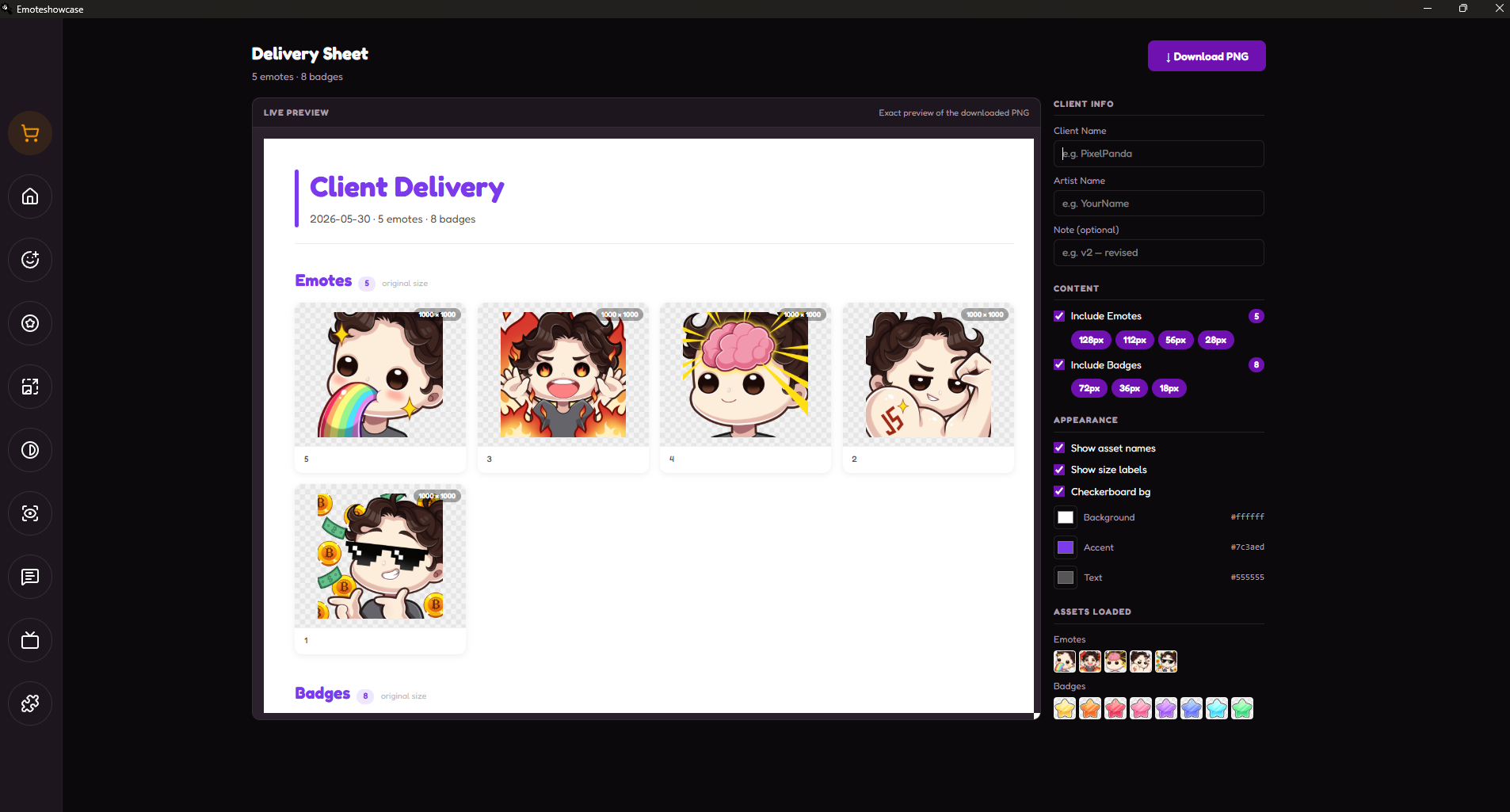
Delivery Sheet turns the emotes and badges loaded in EmoteShowcase into a single, polished PNG document you can send straight to a client for approval. Instead of spending 15–30 minutes laying out a presentation in Photoshop for every project, you generate a clean, branded sheet in seconds — showing each asset at its original size and across every standard export size, all in one image.
Key Features
Originals & Export Sizes in One Sheet
The sheet shows every asset at its true original dimensions (with the exact pixel size labelled), then a dedicated section displaying each emote at 128, 112, 56, and 28 px and each badge at 72, 36, and 18 px — side by side for instant size comparison.
Modern Gallery Layout
A clean, card-based design with subtle shadows, rounded corners, and clear section separation — the kind of professional handoff document clients expect from design tools like Figma or Dribbble.
Full Branding Control
Add the client name, your artist name, and an optional note. Customise the background, accent, and text colours to match your brand. Your appearance settings are remembered automatically, so you never reconfigure for the next client.
Live WYSIWYG Preview
The on-screen preview is the exact document you download — pixel for pixel. Toggle asset names, size labels, and a transparency checkerboard background, and watch the sheet update in real time.
Transparency Previews
Every asset sits on a checkerboard background so clients can clearly see transparent edges — essential for confirming clean cut-outs before final delivery.
Why Use Delivery Sheet?
- Win approvals faster: Give clients a clear, professional overview of every asset and size at a glance.
- Save time: No more manual Photoshop layouts — one click produces the whole sheet.
- Consistent branding: Saved colour settings keep every delivery on-brand.
- Works offline: All rendering is local. Your artwork never leaves your computer.
- No subscriptions: Buy once, use forever. Updates are included with your EmoteShowcase license.
How to Get It
- If you do not own EmoteShowcase yet, purchase it on Itch.io (Windows only).
- Download and install the latest version of EmoteShowcase.
- Open the app and go to the Plugin Store from the toolbar.
- Find Delivery Sheet and click Buy Now — a purchase popup powered by Itch.io appears inside the app.
- Complete the purchase and download the plugin .zip file.
- Go to Plugin Manager, click Install Plugin, and select the .zip file.
- The Delivery Sheet view will appear in your tools. Load your emotes and badges, then generate your sheet.
Windows Security Notice: When you first run EmoteShowcase on Windows, you may see a SmartScreen warning that says "Windows protected your PC." This is normal for applications that are not digitally signed. Click "More info" then "Run anyway" to launch the application. This step is only required on the first run.
EmoteShowcase — Professional Emote & Badge Desktop Tools
jorgedevreact.itch.io/emoteshowcase
Purchase
In order to download this project you must purchase it at or above the minimum price of $2.30 USD. You will get access to the following files:
Leave a comment
Log in with itch.io to leave a comment.