Plugin: Emote Puppet
A downloadable tool
Emote Puppet — Hand-Animate Your Emotes for EmoteShowcase
Important: Emote Puppet is a plugin for EmoteShowcase — a Windows desktop application. It is not standalone software. You must own EmoteShowcase to use this plugin. If you do not own it yet, purchase it here first.
What Is Emote Puppet?
Emote Puppet is a hands-on animation editor for a single static emote. Where Live Emote applies ready-made motion presets, Emote Puppet puts you in control: deform the image with a pin & pull mesh, move / scale / rotate / fade / hue-shift it, drop keyframes on a timeline, and the studio interpolates everything into a smooth, perfectly seamless animated GIF. Build exactly the motion you imagine, step by step. Rendered at high quality with the same libvips engine (sharp) the app uses for its core exports.
Key Features
Pin & Pull Mesh Deformation
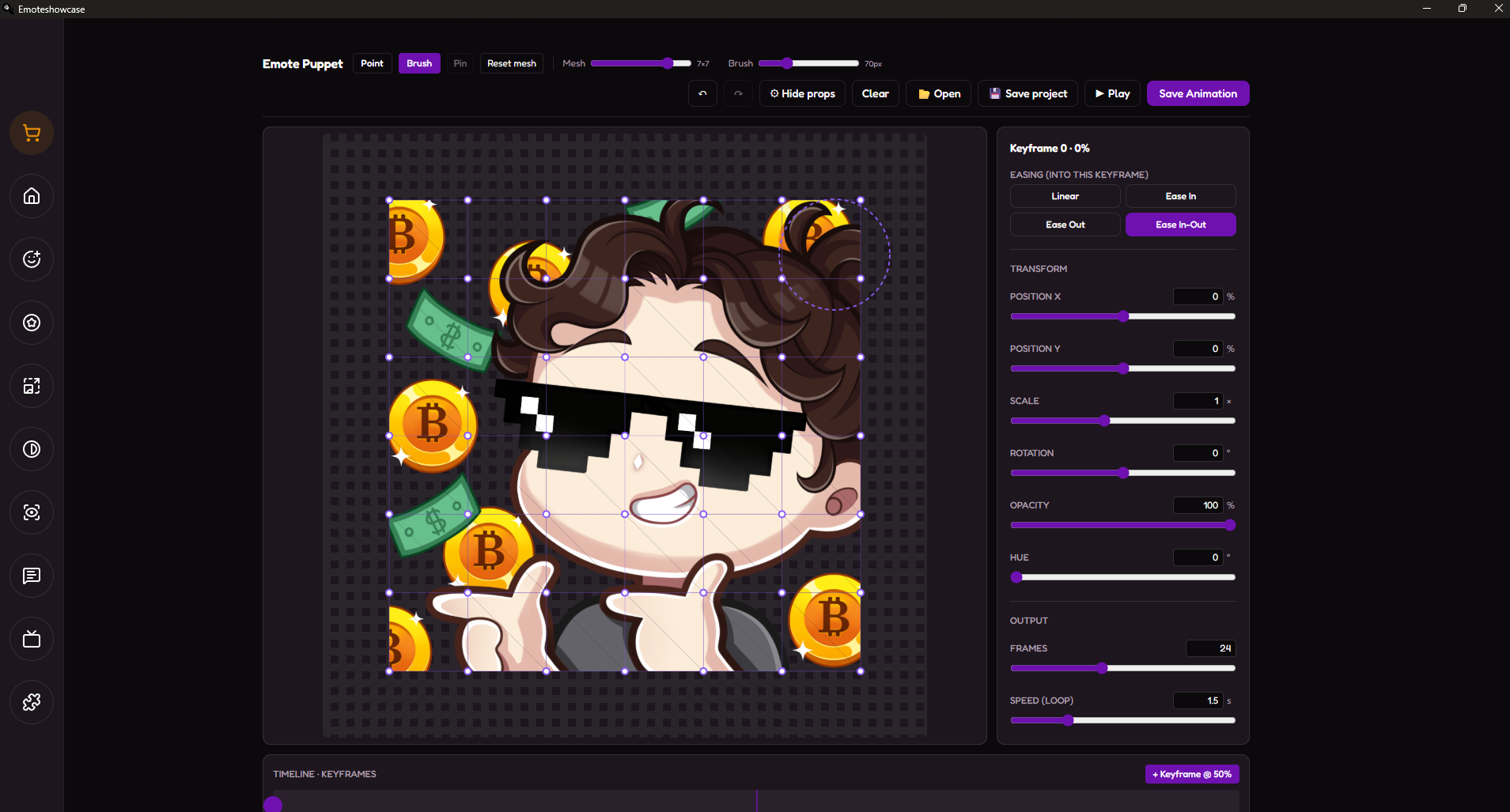
A control mesh sits over your emote. Pin the parts you want to stay put (like the base), then drag any point and the surrounding area follows with a smooth falloff — bend, stretch, squash and wave a single image like a puppet.
Adjustable Mesh Density & Brush Tool
Choose how fine the mesh is — from a coarse grid for big, simple moves up to a dense grid for detailed deformation. Switch to the Brush tool to push many points at once inside an adjustable radius, sculpting whole regions in a single stroke instead of point by point.
Keyframe Timeline
Add keyframes anywhere on the timeline, pose your emote at each one, and Emote Puppet interpolates the in-between frames for you. Select or delete any keyframe right from the timeline, and choose the easing (linear, in, out, in-out) into each one for natural acceleration.
Full Transform Control
Beyond the mesh, every keyframe stores a global transform — position, scale, rotation, opacity and hue. Combine a bounce with a deform, a fade with a spin: layer movement and deformation however you like.
Real-Time Preview & Seamless Loops
Press play to watch your animation loop live as you build it. The timeline is circular, so the last keyframe always flows back into the first — your emote loops forever with no jump or stutter.
High-Quality GIF Export
Set the frame count and loop speed, then export at your image's original size. Frames are stitched with the libvips (sharp) engine and Floyd–Steinberg dithering for a clean, smooth GIF — with a progress bar so the app never feels frozen.
Save Projects & Pick Up Later
Save your whole session — image, mesh, every keyframe and setting — as a single .puppet file. Reopen it any time to keep working or make changes, just like real animation software: it asks where to save once, then quietly overwrites that file on every save. Perfect for client revisions. Full undo / redo (buttons or Ctrl+Z / Ctrl+Shift+Z) lets you experiment without fear.
Why Use Emote Puppet?
- Total creative control: Not limited to presets — craft any motion you can picture, keyframe by keyframe.
- Sell premium animations: Offer custom animated emotes from art you already drew, a higher product tier.
- Save & revise anytime: Keep your work in a .puppet project file — reopen it to tweak or handle client change requests without starting over.
- One image in, GIF out: No frame-by-frame drawing — deform and keyframe a single PNG.
- Pro-quality output: High-quality libvips (sharp) rendering keeps your emote crisp at any chat size.
- Works offline: All processing is local. Your art never leaves your computer.
- No subscriptions: Buy once, use forever. Updates are included with your EmoteShowcase license.
How to Get It
- If you do not own EmoteShowcase yet, purchase it on Itch.io (Windows only).
- Download and install the latest version of EmoteShowcase.
- Open the app and go to the Plugin Store from the toolbar.
- Find Emote Puppet and click Buy Now — a purchase popup powered by Itch.io appears inside the app.
- Complete the purchase and download the plugin .zip file.
- Go to Plugin Manager, click Install Plugin, and select the .zip file. Restart the app once so the renderer loads.
- Open the Emote Puppet view, drop in a static emote, deform it, add keyframes and export — or save it as a .puppet project to continue later.
Windows Security Notice: When you first run EmoteShowcase on Windows, you may see a SmartScreen warning that says "Windows protected your PC." This is normal for applications that are not digitally signed. Click "More info" then "Run anyway" to launch the application. This step is only required on the first run.
EmoteShowcase — Professional Emote & Badge Desktop Tools
jorgedevreact.itch.io/emoteshowcase
Purchase
In order to download this tool you must purchase it at or above the minimum price of $7.99 USD. You will get access to the following files:
Leave a comment
Log in with itch.io to leave a comment.